eseq user manual
Mixer
The mixer is where a track's sound is balanced, placed and routed. Every track has a strip with a fader, pan, two sends, mute, solo, arm and an output choice. Tracks can be summed into groups. Parts of any track can be sent to shared buses, and everything ends at Main. Each group, bus and Main has its own audio effects chain, and modulation cables carry a Modulator track's signal to another track's or bus's external inputs.
The mixer sits below the sequencer. The mixer button at the left of the transport shows or hides it, as does View > Show Mixer. Opening the arrangement view hides the mixer; returning to the session view restores it as you left it.
From left to right, the mixer shows:
- the track strips, in track order, with each group drawn as a coloured container around its members;
- the Drop sounds here zone, which creates new tracks;
- the bus strips, with Main last.
The signal path
When a track plays a note, its audio passes through the mixer in this order:
- The instrument's output passes through the track's audio effects chain.
- The strip's fader sets the level, and mute and solo act here. The pan control places the sound in the stereo field.
- The sends tap the signal after the fader and feed Bus A and Bus B at their own levels.
- The strip's output carries the main signal to Main, to a bus or group, or nowhere (sends only). A track inside a group always goes to the group.
- Each group and bus runs its sum through its own effects chain and fader, then passes it to its output: Main or another bus.
- Main runs the whole mix through its chain and fader.
Because the sends come after the fader, turning a track down also turns down what it sends, and muting a track silences its sends too. eseq delays parallel paths where they meet, so a track with a latency-heavy effect stays in time with its sends and with the rest of the mix. See Audio effects.
The track strip
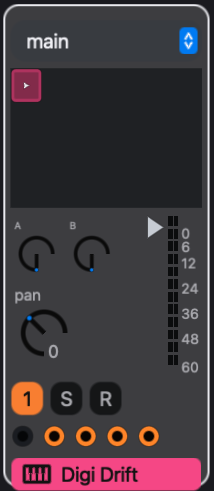
A strip holds, from the top:
- Output menu. Where the strip's main signal goes: main, sends only, or a bus or group by name. Choosing a group here routes the audio to the group's channel without making the track a member; to add a member, drag its name badge onto the group. Strips inside a group have no output menu.
- Pattern cells. One cell for each pattern used by a scene in the viewed bank, plus any pattern no scene uses, six to a row. Each cell shows its pattern's sound glyph. The playing pattern shows a play mark. Clicking a cell assigns that pattern to the current scene and launches it, following the transport's launch quantization; a cell waiting for its boundary blinks. See Patterns and scenes.
- Sends, pan, fader and meter. Below the cells, the A and B send knobs (0 to 1) sit above pan (-1 left to 1 right, centred at 0). The fader and meter are to their right. The triangle beside the meter is the fader; click or drag anywhere in the meter area to set it. The fader runs from -60 dB to +6 dB, and fully down is silent; a new track starts at 0 dB.
- Numbered button, S, R. The numbered button is the track's mute. It is lit while the track is passing audio and goes dark when the track is muted, whether by its own mute or by another strip's solo. S solos the track. R arms it for live input.
- Modulation ports. One output port on the left and four input ports. See Modulation cables, below.
- Name badge. The track's name, in the track's colour, with an icon for its instrument type. Double-click it to open the track in the piano roll. Right-click the strip for its menu.
Note: the fader, pan, sends, mute and output are part of the pattern's mix, not of the track. Launching another pattern can move them. See Who recalls what, below.
Solo
Soloing a track mutes every track that is not soloed. The soloed track's destinations stay open: its output bus or group and the buses it sends to keep playing, so a soloed snare still reaches its reverb.
Soloing a bus or a group keeps playing the tracks whose output goes to it, directly or through other buses, and mutes every other track that is not itself soloed. Sends do not count: soloing a send-return bus, such as a reverb on Bus A, mutes the tracks that feed it by send, so the bus falls silent. To hear a track through its reverb, solo the track instead.
Solo on a track is a live control only; it is not saved with the pattern or the project.
Sends and buses
A bus is a mixing channel with no instrument of its own. It sums whatever is routed to it, runs the sum through its effects chain, and passes it to its output. A new project has two buses, Bus A and Bus B, plus Main.
The usual use is a shared effect. A track keeps playing dry through its own output while a send copies part of its signal to the bus:
- Click the Bus A strip to select it. The device panel shows the bus's effects chain.
- Add an effect from the browser, typically a reverb or a delay with its mix set fully wet. Double-clicking an effect adds it to the selected bus; you can also drag it onto the bus strip. Bus strips accept audio effects only.
- Raise the A knob on each track that should reach the reverb. The knob sets how much of that track reaches it.
The Bus A meter now shows the wet signal, and the Bus A fader sets the reverb's level in the mix.
Create > Bus adds another bus, named Bus 3, then Bus 4, and so on. Track strips show sends only for Bus A and Bus B. To feed an added bus, choose it in a track's output menu, which routes the whole track through it, or choose it in another bus's output menu. An added bus cannot be removed from the mixer.
A bus strip holds an output menu, a fader and meter, a mute button (labelled A or B on the two default buses and with a number on added ones), S, four modulation input ports and the bus name. On bus and group strips, drag the fader triangle itself; clicking the meter selects the bus. A bus can output to Main or to another bus. The menu offers only destinations that cannot feed back to the bus itself. Each bus, group and Main chain holds up to 8 audio effects.
Main is the last strip. It has a fader, meter, mute (M) and solo, and an effects chain for the whole mix. It has no output menu and no modulation inputs.
Send locks and process lanes
Send levels can change per step. With steps selected in the sequencer, turning a send knob writes a parameter lock for those steps instead of changing the base value, as with any lockable control. A send knob with locks shows the lock marker; right-click it for Clear p-locks, and, with steps selected, a second item that clears only the selected steps. See Parameter locks.
A process lane can also drive a send. While mapping a lane's output, the send knobs on that lane's own track light up as targets; click one to bind it. The knob then shows the lane's last written value as an amber dot. See Process lanes.
Fader and pan are not lockable from the mixer. For per-step placement, use the step Pan parameter in the sequencer.
Groups
A group sums several tracks into one bus and gives them a shared fader, mute, solo and effects chain. Members keep their own patterns, instruments, effects and strips. Only their output changes: it goes to the group rather than to Main.
To create a group:
- Select the tracks. Shift-click a strip to select a range, or Command-click to add or remove one track.
- Press Command-G, or right-click one of the selected strips and choose Group Tracks.
The group appears as a coloured container. Its own strip, at the left, holds the group's output menu, fader and meter, M and S, four modulation inputs and a name badge with a collapse button. The group's fader and buttons act on its bus.
- Click the collapse button to hide the member strips.
- Double-click the group's badge to show its effects chain in the device panel.
- Right-click the badge for Rename, Convert to Drum Rack and Ungroup. Ungrouping leaves the members as loose tracks.
- Click the group's badge and press Backspace or Delete to delete the group together with its member tracks. Command-Z undoes it. To keep the tracks, use Ungroup.
- Drag a track's name badge onto a group to add it. Drag it onto Drop sounds here to take it out of its group. Right-clicking a member strip also offers Ungroup track.
- Drop an instrument or a sample on the group's strip to create a new track inside the group. Built-in instruments cannot be added this way.
- Drop an audio effect on the group's strip to add it to the group's chain.
A group can output to Main or to a bus, but not to another group. The exception is a Drum Rack, which can be placed inside a group; its output then belongs to that group. See Racks.
A group's chain hears the sum of its members. A compressor on a drum group reacts to the whole kit; the same compressor on the kick's own chain reacts to the kick alone.
A Drum Rack appears in the mixer as a group of this kind, with an arm button on its strip and, once it has rack clips, a clip list where the pattern cells would be. Its menu adds the rack's own commands. See Racks.
Modulation cables
The small ports near the foot of each strip route modulation signals between tracks and buses.
- The output port, on the left of a track strip, is active only on a track that can produce a modulation signal: a track playing the built-in Modulator, or an instrument that declares a modulation output.
- The four input ports on a track strip, and on each group and bus strip other than Main, are the destination's external modulation inputs 1 to 4. A Modulator track has no inputs.
To connect a cable, drag from an active output port to an input port, or click the output port and then the input port. A track cannot modulate itself. A port lights with the signal passing through it.
A cable delivers a signal; it does not decide what the signal changes. At the destination, set a modulation slot of the instrument or of an effect to the matching source, ext1 to ext4, and map that slot to the parameter. On a bus or group, the inputs reach the effects in its chain. See Instruments and Audio effects for modulation slots.
To remove a cable, click it to select it, then press Backspace. Modulation routings belong to the scene, so each scene can wire them differently.
Who recalls what
eseq splits the mixer's state between patterns, scenes and the project. This decides what moves when you launch something.
- Stored with the pattern: a track's fader, pan, send levels, mute and output, together with its instrument and effect settings. Launching another pattern on a track can move all of them.
- Stored with the scene: each bus's and group's output destination and the values of its effects, and the modulation cables. Launching a scene recalls them.
- Stored with the project: each bus's and group's fader, mute and solo, and which effects are in its chain.
- Not stored: track solo.
Suppose a bass track has two patterns. Pattern 1 has its fader at -6 dB and no send. Pattern 2 has its fader at 0 dB and send A at 0.4. Bus A carries a reverb with a long decay in scene 1 and a short decay in scene 2.
- Clicking bass pattern 2's cell while scene 1 plays raises the bass and sends it to the long reverb. Scene 1 now names pattern 2 for the bass; no other track changes. While the arrangement plays, the click is an override instead and leaves the scene alone; see Arrangement.
- Launching scene 2 switches the bass to whatever pattern scene 2 names, and shortens the reverb.
- Moving the Bus A fader changes it in both scenes.
A knob that changes on its own after a launch is following the pattern or the scene. To set one track or bus effect value everywhere, use Copy current values to all scenes in the effect header's ••• menu; see Audio effects. The rest of the scene and pattern split, and how patterns share or fork their mix, is in Patterns and scenes, under Who owns what.
Selecting and editing
- Click a strip to select its track. The sequencer scrolls to the track, and the device panel follows it. Shift-click and Command-click extend the selection as in the sequencer.
- Click a bus strip, or a group's strip, to select that bus. The device panel then shows the bus's chain, and effects added from the browser go there.
- With the mixer focused, Left Arrow and Right Arrow move the selection through the tracks and then the buses.
- Click a track's name badge, a group's badge, a pattern cell or a modulation cable, then press Backspace or Delete, to delete that track, group (with its members), pattern or cable. A deleted group and its tracks come back with Command-Z.
- With a pattern cell selected, Command-D duplicates the pattern.
- Right-click a strip and choose Rename to rename the track.
The mixer also accepts drops. Drop a sample, instrument or sound on a track strip to load it on that track, where the track's type allows it (see Instruments), and an audio or MIDI effect to append it to the track's chain. Drop a sample, instrument or sound on Drop sounds here to create a new track.
Layout and hardware
The mixer's size can be changed in File > Customize…. The mixer-show-clip-grid setting hides the pattern cells for a compact mixer, mixer-clip-area-height makes the cell area taller, and track-strip-width and bus-strip-width set the strip widths. See Keys and customization.
eseq includes a factory mapping for the Akai MIDImix, whose faders, knobs and buttons follow the mixer's strip order. It is described in Recording.