eseq user manual
Patterns and scenes
A track can hold many patterns; a scene chooses one pattern for every track. This chapter covers making pattern variations, launching them, organising scenes into banks, sharing a sound between patterns and morphing between scenes. The model behind all of it is set out in Concepts; this chapter explains how to operate it.
Who owns what
A pattern belongs to one track and holds its sequence and its sound: a patch (the instrument, effect chains and their p-locks) and a mix (level, pan, mute, sends and output). A scene holds no notes: it chooses a pattern for each track and owns the state that must not change when one track switches, such as bus and group settings and modulation routings. Concepts lists both in full.
This split explains most surprises. If a track's filter or fader moves when you switch, that track launched a different pattern. If a bus or group control moves, a different scene was launched.
Pattern cells
Every track keeps a pattern pool: all the patterns it can play. The mixer shows the pool as a grid of pattern cells at the top of each track strip, six to a row. Each cell shows the glyph of its pattern's sound, tinted with the track colour.
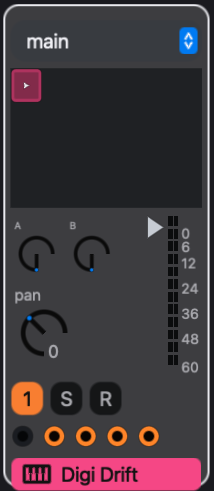
A cell has three states:
- a play triangle marks the pattern the track is playing;
- a blinking ring marks a pattern waiting for a quantized launch;
- a white outline marks the selected cell, the target of Command-D and Delete.
The grid shows the patterns used by scenes in the viewed scene bank, plus any pattern no scene uses. Those unused patterns appear in every bank, so a fresh copy is never hidden.
Launching a pattern
Click a cell to launch that pattern on its track. What the click does depends on the transport.
While the transport is stopped:
- The pattern becomes the current scene's choice for that track. This is an edit to the scene, and Command-Z undoes it.
- The cell becomes the selected cell.
- The track switches at once and takes the pattern's sound: its instrument and effect settings and its mix.
While the transport is playing:
- The track switches at the next launch boundary (see Launch quantization below) and takes the pattern's sound.
- The scene is left unchanged. The launch is an override, and Back to Arrangement in the transport lights.
- The override lasts, through Stop, until you click Back to Arrangement. See Arrangement.
No other track changes. To change every track at once, launch a scene. To change which pattern a scene chooses, click the cell while the transport is stopped.
Copying and deleting patterns
To make a variation of one track, click its cell and press Command-D in the mixer. Pattern > Clone Track Pattern does the same from the menu bar. The copy gets its own patch and mix, replaces the original in the current scene, and starts playing. Other scenes keep the original. Edit the copy freely: nothing you do to it is heard in those scenes.
Two scenes share a pattern when both point at it, and an edit to a shared pattern is heard in both. To share a pattern on purpose, stop the transport, make the second scene current and click the pattern's cell.
To delete a pattern, click its cell and press Delete. The pattern leaves the pool. Every scene that pointed at it is left with an empty choice for that track, so the track is silent in those scenes. Deletion can be undone.
Scenes
The transport shows the scenes of the viewed bank as numbered buttons. The numbers count from 1 within each bank. The current scene is lit, and a scene waiting for a quantized launch pulses.

Click a scene button to launch the scene. At the launch boundary:
- Every track switches to the pattern the scene chooses for it, and with it to that pattern's sound. A track with no pattern in the scene goes silent.
- The scene's bus and group settings, modulation routings, graph sequencer state, rack clip choices, project-wide lanes and scene values replace the current ones.
- The scene becomes the current scene. Track edits go to the patterns it chooses; bus, group, modulation and scene-value edits go to the scene itself.
- The launch is an override of the arrangement. Back to Arrangement lights and stays lit after Stop, so Play plays the launched scene until you click it. See Arrangement.
A track whose pattern is the same in both scenes plays the same notes after the launch.
Clicking another scene while one is waiting replaces the waiting launch.
Launch quantization
The launch quantization menu sits in the transport, after the scene transpose field. It decides when a launch is heard:
- off: at once;
- 1/16, 1/8, 1/4, 1/2: at the next sixteenth, eighth, quarter or half note;
- 1 bar: at the next multiple of four quarter notes.
Boundaries fall on the transport's beat grid, not on each pattern's own loop. At 1 bar, a 12-step pattern switches on the bar line even when it is partway through its own cycle.
The same setting applies to scene buttons, pattern cells and rack clips. While the transport is stopped, every launch is immediate.
Note: while the transport plays, a quantized cell launch changes what the track plays at the boundary but never changes the scene. To change a scene's choice, click the cell while the transport is stopped.
Creating, deleting and moving scenes
Press + to create a scene at the end of the viewed bank. Create > Scene in the menu bar does the same in the current scene's bank. The new scene copies every track's current pattern, with its own patch and mix, and copies the scene-owned state. It becomes the current scene and sounds the same as the one it came from. It shares nothing with it. Concepts lists the steps in full.
A bank holds at most 24 scenes. When the viewed bank is full, + is dimmed and clicking it reports "This scene bank is full (24 scenes maximum)".
Press - to delete the current scene. The scene that takes its place in the list becomes current, or the previous one if you deleted the last. This can be the first scene of the next bank; the dot beside the bank menu then shows that the current scene is elsewhere. - is dimmed when the project has only one scene, and when the current scene is in a bank you are not viewing. Deleting a scene does not delete its patterns. They stay in their pools as unused patterns.
To reorder scenes, drag a scene button onto another. Arrangement markers that refer to the moved scene follow it. Waiting launches are cancelled.
Note: pressing a scene button launches it, so dragging a scene to move it also launches it.
To move a scene to another bank, right-click its button and choose Move to bank followed by the bank's name. The scene goes to the end of that bank. Full banks and the scene's own bank are dimmed.
Create, delete, reorder and move are all undoable.
Scene banks
A scene bank is an ordered group of up to 24 scenes. The number of banks is not fixed. Banks are named A, B, C and so on in order, until you rename them.
The bank menu at the right of the scene buttons chooses which bank the transport shows. Viewing a bank launches nothing. The mixer's pattern cells follow the viewed bank. When the playing scene is in a different bank, a small dot beside the menu says so.
- New bank at the bottom of the bank menu creates an empty bank and shows it, as does Create > Scene Bank in the menu bar. Press + to fill it; each new scene starts as a copy of the current scene.
- Right-click the bank menu and choose Rename bank to name the viewed bank.
- Delete bank in the same menu removes the viewed bank but keeps its scenes. They join the previous bank, or the next one if you delete the first. The item is dimmed when only one bank exists, or when the merged bank would hold more than 24 scenes.
Banks suit a live set that needs more than 24 scenes. For example, bank A can hold the scenes of one song and bank B the next, and you can view bank B while bank A is still playing.
The MIDImix preset's Bank Left and Right buttons step to the previous and next scene, crossing bank boundaries, and obey launch quantization (see Recording). To map another controller, call eseq.transport/seq-switch-relative with -1 or 1.
Scene push
Scene push morphs the current sound toward another scene's values while you hold the mouse. It never changes patterns and it saves nothing. Release the button and every control returns to its value.
- Shift-press a scene button: the controls jump to that scene's values. Drag downward to ease back toward the current scene's values.
- Command-press a scene button: the controls start at the current values. Drag downward to move toward the target scene's values.
The morph covers the instrument, audio effect and rack macro values of each track's pattern in the target scene, and the effect values of each bus. It covers only controls whose values differ, and only where the target uses the same instrument or effect. It does not cover fader levels, pan, sends, or mute. A control already mapped to a project macro is left out.
Push is a performance gesture. A plain click on the same button still launches the scene.
Sharing a sound
Each pattern normally has its own patch and mix. The sound palette, titled Sound Pool on screen, shows those sounds and can link or unlink them. It lists every patch in one track's pool as a card, showing:
- the patch's name, such as Patch 3, with (scene) on the one the current scene uses;
- green +n and red -n counts of the controls that are higher or lower than in the current sound;
- TRK on the track's own sound, the one an empty arrangement lane monitors and records with;
- where the patch is used;
- the preset or sample it came from.
The current card is outlined in its colour.
To open the palette:
- click the badge beginning with > in the instrument panel header, which names the pattern or take the panel is editing (for example > Pattern 2 (scene));
- or press
C-c p: with a clip selected in the arrangement it opens on that clip's pattern or take, otherwise on the current track.
The header names the track, its instrument and the target the palette acts on, for example Sound Pool - Track 3 (Digi Syn) - Pattern 4. The target is a pattern, a take or a scene cell. The palette has three actions:
- Click a card to apply that patch to the target. This links rather than copies: the target now uses the same patch, so later edits to it are heard wherever it is used. The target keeps its own mix. The patch carries its instrument and effect p-locks, so after Apply the target's steps play the source's locks.
- Click + in the header to fork the target's sound: it gets new copies of its patch and mix, and stops sharing.
- Click a card's name to rename it, and click ok to confirm.
Each action is one undo step. An edit to a shared patch is also one undo step, even though every pattern that uses the patch hears it.
To set one control across every scene without linking anything, use the ••• menu in the device's header. Copy current values to all scenes writes the device's current values into every pattern of the track. On a bus effect it writes them into every scene. An Instrument Rack header offers Copy rack (all slots) to all scenes; see Racks.
A worked example
A project has three tracks, Kick, Bass and Keys, and one scene, which chooses each track's first pattern. Start with the transport stopped and set launch quantization to 1 bar.
Press +. Scene 2 is created, becomes current, and plays Kick 2, Bass 2 and Keys 2, copies of the first patterns. In scene 2:
- click the Kick track's mute button;
- with no steps selected, raise the Bass instrument's filter cutoff;
- click the Keys 1 cell in the Keys strip, so both scenes share Keys 1.
The scenes now choose:
            Kick            Bass              Keys
Scene 1     Kick 1          Bass 1 (dark)     Keys 1
Scene 2     Kick 2 (muted)  Bass 2 (bright)   Keys 1
Start playback and click scene 1. Its button pulses until the next bar line. Then the kick comes back and the bass darkens. Mute is part of the mix, and the mix belongs to the pattern, so Kick 1 was never muted. The keys play on unchanged. Keys 2 still sits in the pool as an unused pattern.
With scene 1 playing, Shift-press scene 2 and hold. The bass filter opens to scene 2's cutoff. The kick keeps playing, because push does not touch mute or patterns. Drag downward and the cutoff eases back toward scene 1's value; release and it returns to that value.
Now make both bass patterns use one sound. Click scene 2 and wait for the bar line, then open the palette on the Bass track and click the card that scene 1 uses. Bass 2 now uses Bass 1's patch: the filter is dark in both scenes, and a cutoff change in either scene is heard in both. Each pattern keeps its own fader, because Apply links the patch only. Press + in the palette header to separate them again.