eseq user manual
Process lanes
A process lane is a per-step value that feeds a small program, a process, which runs just before the step plays. A step value such as velocity sets one property of the note directly. A process lane's value is an input: the process can add it to a running total, compare it with a threshold, draw a random number, borrow a value from another track, or silence the step. It can then write the result to the step's own values, to another lane, or to any mappable instrument, effect or send control on the track.
Processes remember things between steps. A few sparse lane values can therefore produce a transpose that climbs each pass, a filter that moves to a new random position on chosen steps, or a stutter that happens roughly one step in five. If you have used the Cirklon, this is its aux events, accumulators and inter-track grabs, with each job on its own named lane.
Every track has 14 process lanes, and you can add more to a single track. Each track keeps its own lane values and its own running state, so an accumulator on track 1 and the same accumulator on track 2 count independently.
The default lanes
The 14 lanes are listed below in the order they run on every step. The order matters when one lane feeds another; see "Wiring lanes together" below.
- prob: the chance, from 0 to 1, that the step plays. The default is 1. The roll is fresh on every pass, so a step at 0.75 plays on average three passes in four, and on different passes each time. A rejected step is silent, but the lanes after prob still run, so accumulators keep advancing under it.
- reset: a high step clears tacc, acc A and acc B to zero before that step adds its own value.
- rand: on a high step, draws a random number between lo and hi and sends it. Every step is high until you paint it otherwise. With whole at 1, the default, the number is rounded to a whole number. A low step sends nothing. Set hold to 1 to keep sending the last draw on every step, as a sample-and-hold. rand has no target until you map one.
- count: adds the lane value to a counter on every step where the value is not zero, wraps from hi back to lo, and sends the count. It is a generator like rand, but predictable. It has no target until you map one.
- tacc: an accumulator mapped to transpose. Each step adds its lane value to a running total, and the total is added to the step's transpose. Paint 1 on the first step and the line rises one semitone per pass.
- acc A and acc B: two more accumulators. acc A is mapped to retrig and acc B to rate, so a slow ramp on either becomes a ratchet that grows over successive passes. Map either one anywhere else.
- grab: a high step replaces one value on this track with the value on the step the source track is currently playing. value chooses what is grabbed: note, vel, dur or note+b. This is the Cirklon inter-track grab.
- cmp A and cmp B: comparators. Each compares its input with value under op (
<,>,>=,<=,==or!=) and sends 1 when the test passes and 0 when it fails. - veto: a high step is silent. Painted, it is a mute mask. Wired from a comparator, it mutes on a condition.
- roll: a high step rolls the whole project from that step for the step's Duration, repeating a short window at the lane's rate.
- xpose: a high step transposes this track's note by the note the source track is currently playing. This is the Cirklon's "xpose by trk n".
- xpose+b: the same as xpose, but it adds the source's note as heard, after the source's own bar transpose. This is the Cirklon's "xpose by trk n+B".
Lanes run only on steps that play a note. A lane value painted on an empty step does nothing, and it does not advance an accumulator.
Opening a lane
Expand a track, then choose a lane from the menu at the right end of the step value tabs, after rate. With the current track expanded, X opens the first lane, prob. Choose none in the menu to return to the step value lanes.
The grid draws a process lane in amber so it never reads as a note property. The sliders, the number picker above the grid, typing digits, and selections work as they do for velocity; see Step sequencer. The slider range follows the lane's lo and hi. On a lane whose range is wider than 1, such as tacc, the sliders move in whole numbers; the step field in the lane strip changes the increment, and free removes it.
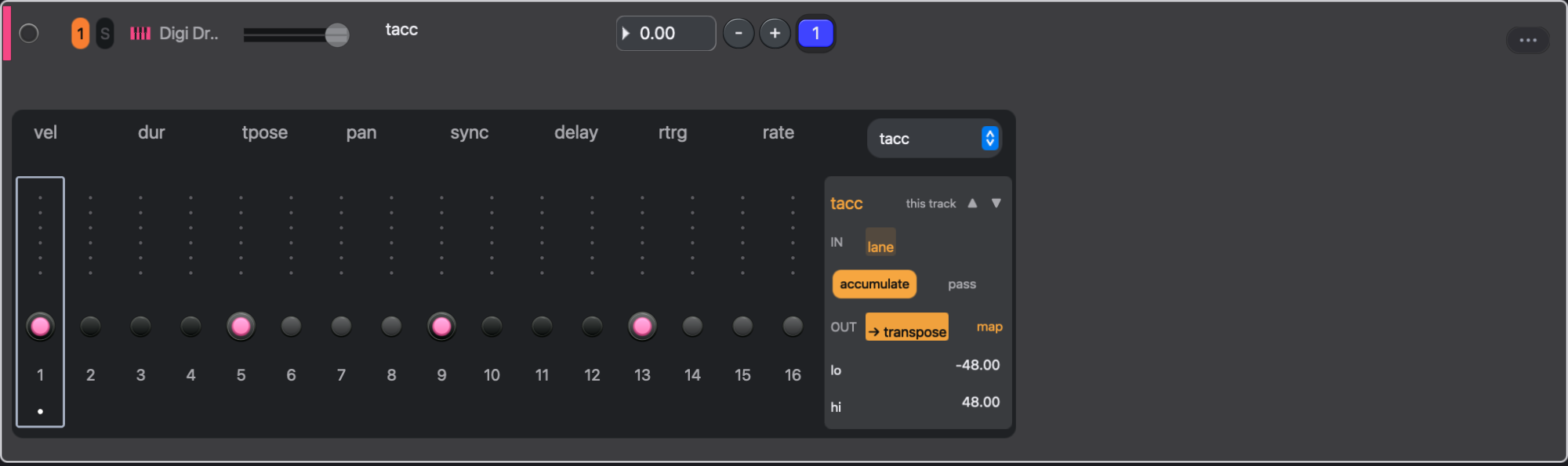
The lane strip
With a lane open, the lane strip appears to the right of the grid. It holds everything about the lane except its per-step values.
- The header shows the lane's name. The on/off button bypasses the lane on this track. The scope chip reads this track or all tracks; a lane you added to the track reads track lane instead. The ▲ and ▼ arrows move the lane earlier or later in the running order.
- IN shows where the lane's input comes from: lane for its own painted values, or the name of another lane wired into it.
- accumulate and pass appear on the accumulators. Accumulate adds each input to the running total. Pass forwards each input unchanged, which turns the accumulator into a relay for whatever is wired into it.
- OUT shows the control the output is mapped to. map changes it, and × disconnects it, so the lane drives nothing until you map it again.
- WIRE appears while the lane feeds another lane, and names that lane. Its × removes the wire.
- NOW shows the lane's current value on this track, with a graph of its last 64 values. It stays hidden until the lane has run on this track.
- The remaining rows are the lane's settings: lo and hi for the range, source for the track that grab, xpose and harmony read, value for what grab takes, op and value for a comparator, rate for roll, whole and hold for the generators.
The accumulators and count wrap: when the total passes hi, it comes back round to lo. tacc's defaults are -48 and 48, four octaves each way. acc A, acc B and count run from 0 to 8, so an acc A ramp grows to eight repeats and then starts again.
This track or all tracks
Lane values are always per track. The strip's settings on a default lane, such as its targets, mode, lo and hi, apply to the current track only while the scope chip reads this track. Mapping rand on track 1 leaves every other track's rand alone.
Click the chip to switch it to all tracks before editing, and the change goes to the shared setting that every track inherits. A track you have edited on its own keeps its own setting. The × on OUT disconnects the output on this track, even if the shared setting has a target. Removing a cable in the patch bay while the chip reads this track drops this track's own wire, and the track takes the shared wiring again. Lanes added to a track are always per track.
Painted lane values and per-track settings are stored with the pattern, so they change when the pattern changes. The shared, all-tracks settings belong to the scene.
Mapping an output
Press map. The track's step value tabs light up, and so do the mappable controls of the track's instrument, effects and mixer sends; the device panel opens so they are in reach. For a lane that can feed other lanes, an OTHER LANES row appears under the grid, listing them. Click a target to bind it. Press map again to cancel.
The first target receives the lane's value as it is, added to the target's own value:
- On a step value, the number is in that value's units. 3 on tpose is three semitones; 3 on rtrg is three repeats.
- On an instrument or effect control, the number is added to the control's position on its 0-to-1 travel, and the result is clamped at the ends. rand's default range of 0 to 12 would pin a filter at the top. Set rand's lo and hi to 0 and 0.3 and whole to 0, and each step opens the filter by a random amount of up to a third of its travel above where the knob sits.
On a step with a parameter lock, the lane adds to the locked value rather than the knob; see Parameter locks.
An instrument control or mixer send that a lane is moving shows the value being played as an amber marker, while the knob itself stays where you set it.
Mapping a lane whose output is already bound adds a second target instead of replacing the first. Each extra target has its own lo and hi fields in the strip. The lane's value is rescaled from the lane's own lo-to-hi range into that target's range and then set. One rand can therefore drive a filter between two positions and retrig between 0 and 3 at the same time. The × beside a target removes it.
Wiring lanes together
The patch bay sits under the step sliders whenever a process lane is open. It has one box per lane, in running order, read left to right and then top to bottom, six to a row. Each box shows the lane's name and an on/off dot, its input ports on the upper row, labelled, and its output port, if it has one, on the lower row. Click a box to open that lane in the strip.
To wire two lanes, drag from one lane's output port to another lane's input port, or click the output port and then the input port. A lane cannot feed itself, and cables stay within one track. Click a cable to select it, and press Backspace or Delete, or click × cable, to remove it. An output can feed any number of inputs.
Choosing a chip in the OTHER LANES row while mapping makes the same connection without the patch bay.
A wired value replaces the painted value on the steps where the writer sends something. On a step where the writer sends nothing, such as rand on a low step, the reader uses its painted value. A comparator with hold at 1 keeps comparing the last value it received instead.
Order counts. Within one step, values flow only forward, from earlier lanes to later ones. A cable into an earlier lane arrives on the next step that plays, and its input port is marked with an arrow (↑). To fix it, select the writer and move it up with ▲.
What happens when a step plays
When playback reaches a step that plays a note:
- The step's own values are read: its note, velocity, duration and the rest, and any parameter locks for the instrument and effects.
- The bar transpose for the step's page is added to its pitch.
- The lanes run in order: the 14 default lanes first, then the lanes added to the track. Each reads its value for this step, or the value wired into it, updates its running state, and writes to its targets.
- If prob or veto silenced the step, the note does not play. The lanes after them have still run.
- The resulting values go on to the rest of the track: MIDI effects, instrument, effects and mixer. On the way, the pitch snaps to the track's scale if it has one, and the scene transpose is added.
The stored pattern is not changed. The next pass reads the same lane values and starts from wherever the running state has got to.
Running state is cleared when playback starts from stopped. It is not cleared by a scene or pattern change, so an accumulator carries on across a switch. Use reset to clear it on a step.
A worked example
Start with a bass track playing one note on steps 1, 5, 9 and 13 of a 16-step pattern. It is, admittedly, not much of a bass line yet.
- Open tacc and set step 1 to 1. Each pass is one semitone higher than the last. Set tacc's lo to 0 and hi to 5: the line rises for four passes and falls back to the written note on the fifth, because the total wraps from 5 back to 0.
- Open prob and set steps 9 and 13 to 0.75. On average each plays three passes in four, and a different selection drops out each time. The tacc climb is unaffected, because it advances on step 1.
- Open rand. Set whole to 0, lo to 0 and hi to 1. Press map and click the instrument's filter cutoff. Each note now opens the filter by a random amount above the knob's setting (or the step's lock), and the amber marker on the knob follows it.
- In the patch bay, drag from rand's output port to the a port of cmp A. Open cmp A and set op to
>and value to 0.8. cmp A now sends 1 on about one note in five. - Drag from cmp A's output port to the gate port of roll, and set roll's rate to 1/32. On about one note in five, the whole project stutters for that step's Duration, one step by default. Raise Duration on steps 1, 5, 9 and 13 to make the stutter last longer.
At every stage the stored notes are the four you started with. All the movement comes from the lanes.
Adding a lane
Each lane does one job. A second job needs a second lane: for example, one grab to take track 1's notes and another to take track 3's velocities. Two instances of a class also keep separate running state.
At the end of the patch bay is a box marked + and add lane. Click it to open Add a lane. The default lane types are listed first, followed by the other processes in the library, including harmony. Choose one, and a new lane is added to the end of this track's running order and opened in the strip, with nothing painted on it. It takes the class name if the track has no lane of that name, otherwise the name plus a number, so a second grab is grab 2. The lane appears in the lane menu under that name.
In the list, the accumulator and comparator types appear as acc and cmp, and xpose and xpose+b appear later as xpose-by-track and xpose-by-track-b. The first group also holds length, which sets the track's pattern length at the end of the current cycle; Stop or a pattern switch restores the length you set. The library also includes repeater (ratchets), echo-track (adds another track's transpose from some steps ago) and neural-scale (snaps the pitch to a scale), which work on tracks, and neural-delay and neural-reset, which act only on graph nodes.
An added lane belongs to the track, not to the pattern: it exists on that track in every scene. Its painted values and strip settings are stored with each pattern, like the default lanes'. The strip has no control for removing an added lane; switch it off to bypass it.
Note: Moving an added lane with ▲ or ▼ changes its position in the current pattern only; other patterns keep their own order.
Borrowing from another track
Four lane types read the step another track is currently playing: grab, xpose, xpose+b and the harmony lane you can add (below). Choose that track with the lane's source. The read happens on the same tick. If the source is on an empty step, the lane uses the last step the source played. Before the source has played anything, the step plays as written.
Notes are measured in semitones from each track's root, so a source sitting on its root note contributes 0.
- grab with value at note replaces this step's pitch with the source's. The track keeps its own tacc offset on top, and a chord moves as a block so that its lowest note lands on the source's note. Set every step of grab high and this track plays the source's melody on its own rhythm. With value at note+b, the source's note includes its page's bar transpose. vel and dur replace velocity and duration.
- xpose adds the source's note to this step's pitch. A source a fifth above its root moves this step up a fifth.
- xpose+b adds the source's note after the source's bar transpose. Use xpose for the written note and xpose+b for the sounding note, so that raising a source page an octave raises this track too.
A source running at a slower timebase holds each of its steps longer: at timebase 1, one source step lasts a bar, so the reading track plays a whole bar under each source note. This is the usual way to drive a sequence from a chord or root track.
The harmony lane
harmony holds this track's notes to the chord and key of the source track's current step. It reads the chord, or the single note, on the source's current step, and takes the key from all the pitches in the source's pattern.
Its lane value, amount, is strictness, not distance. Every pitch class is scored against the chord: chord tones highest, then other notes in the key, then color tones, with clashes lowest. A note that scores at least the amount plays as written; one that does not moves to the nearest pitch class that does.
- At 1, only chord tones play.
- Around 0.5, the track plays its own melody as long as it stays in key.
- Around 0.3, chromatic color passes and only clashes are corrected.
- At 0, nothing is changed.
amount starts at 1 on every step, so a new harmony lane allows only chord tones until you paint lower values. source starts at track 1.
grace is a dead zone from 0 to 3 semitones: a correction that small is skipped. A chord stays in effect through the source's empty steps until its next note, so a chord track with rests between changes still harmonizes every step of the follower.
The harmony lane can also be added to a graph node's process patch, where it can follow a neuron instead of a track; see Packages for process patches.
The roll lane and the ROLL button
The transport's ROLL button turns on roll mode. A sequence roll makes every track loop a short window of its own pattern, one note long at the roll rate, while the transport keeps running underneath. When the roll ends, playback resumes where it would have been.
To roll the sequence by hand, turn on roll mode (ROLL, or ;) and hold the backtick key in the step grid; keys 1 to 8 choose the rate (see Recording).
The roll lane starts a sequence roll on a high step and holds it for that step's Duration, measured in steps on the track's timebase, so a Duration of 2 holds it for two steps. If roll mode was off, the lane turns it on for the roll's duration and off again afterwards; if you had turned it on yourself, it stays on. The ROLL button turns red while a roll runs.
- A roll that is already running ignores further roll steps, so a step repeated inside the rolled window cannot restart it.
- The rate must be finer than the step to be heard. A 1/16 step rolled at 1/16 has nothing to repeat.
- A roll started by the lane is not recorded.
Writing your own
Every lane on this page is a process written in eseq's Lisp with def-process. The built-in definitions are in content/processes/builtin.lisp. A process can read other tracks, keep its own state, silence or repeat a step, and write to any mappable target. Other processes eseq has loaded, such as those a package defines, appear in Add a lane after the built-in ones. MIDI effects are a separate stage: they transform the notes a step produces rather than deciding per step; see MIDI effects. For writing and loading processes, see Packages.