eseq user manual
Troubleshooting
This chapter lists symptoms and their causes. Each entry names what to check, in the order most likely to find the problem, and links to the chapter that explains the mechanism.
Most surprises in eseq come from its data model rather than from faults. A track's sound and mix are stored with the pattern it is playing, not with the track. A scene points at patterns but does not contain them. Selected steps turn control edits into parameter locks. An armed track takes the letter keys. When something behaves unexpectedly, first establish four things:
- which track is current (the step inspector header names it);
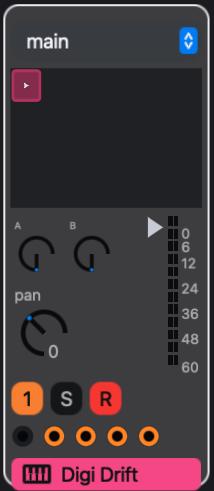
- which pattern that track is playing (the play triangle in its mixer cells);
- which scene is current (the lit scene button in the transport);
- whether any steps are selected (the count in the step inspector header).
Concepts sets out the model these answers refer to.
Silence
A track makes no sound
A note passes through several stages on its way to the output, and any of them can stop it. Check them in the order the note meets them:
- Something must trigger the track. The transport is playing and the track's pattern has lit steps. In the current scene the track has a pattern: a scene whose choice for the track is empty leaves it silent, and deleting a pattern empties that choice in every scene that used it. In the arrangement, a clip must cover the playhead on that track's lane.
- Process lanes can silence steps. A prob value below 1 skips steps on some passes, and 0 skips them always. A high veto step is silent. Open the lanes on an expanded track to see what is painted; see Process lanes.
- MIDI effects transform the notes. Switch each effect's enable dot off to rule it out. The enable dot can itself be locked, so an effect may be off on some steps only. See MIDI effects.
- The track needs a sound source. A track made with Create > MIDI Track has no instrument until you give it one. A sampler with no sample shows No sample in its panel.
- The audio effects process the sound. A closed filter, a gate or compressor at an extreme setting, or an effect's output level at minimum can silence a track. Switch effects off with their enable dots to find the one responsible.
- The mix passes it on. The numbered button on the strip is the mute; it is dark while the track is muted, either by its own mute or because another strip is soloed. Check the fader, and check the output menu: sends only routes nothing to Main, so with both sends at zero the track is silent.
- Groups, buses and Main have their own mutes and faders. A track inside a group is only as loud as the group.
The meters narrow the search. If a track's meter moves but the Main meter does not, the problem lies after the strip: its output, group or bus. See Mixer.
Note: mute is part of the pattern's mix. A track that goes silent when you launch a pattern or a scene has usually switched to a pattern whose mix is muted.
A Drum Rack is silent in one scene
Once a Drum Rack has rack clips, each project scene points at one of its clips or at none, and with none the rack is silent. Launch a clip from the rack's cells to give the current scene one. Deleting a clip leaves every scene that pointed at it silent. A break kit loaded from the Kits tab is silent in every existing scene until you launch one of its clips. See Racks.
The arrangement plays silence
Only clips make sound. A scene marker recalls the scene's project-wide state, such as bus and group settings, but places no notes; use Place Scene Patterns to write the scene's patterns into the lanes as clips. Once playback has started from a clip, a stretch where a marker has no clips beneath it is silent. Playback also runs on past the last clip, so a moving playhead does not mean anything is placed there.
Pressing Play where every lane is silent does not give silence: eseq launches the selected scene and loops it instead, as described under Arrangement below. See Arrangement.
A launch waits before it is heard
Clicking a pattern cell or a scene button while the transport plays switches at the next launch boundary, set by the launch quantization menu in the transport. A blinking ring on the cell, or a pulsing scene button, shows a launch that is waiting. Set quantization to off to switch at once. See Patterns and scenes.
A graph sequencer does not play
A graph sequencer is a package module, so it runs only in a project that loads it. In the browser's Packages tab, right-click the module: Attach to Project loads it for this project, and Always Load loads it for every project. Once it is loaded, its tab appears beside Seq at the top of the sequencer.
A node fires only when something starts it, such as a seed from a track's steps, and its notes go to the track in its route. A route set to Off, or to a track with no sound, plays nothing. When a Drum Rack owns the sequencer, its routes address the rack's members, and routes that pointed at tracks outside the rack are switched off. See Racks and Packages.
Keys and input
The computer keyboard does not play notes
The keyboard plays notes only while a track or a Drum Rack is armed. Arm one with the circle at the left of its track header, R on its mixer strip, or Command-R for the selected track.
If a track is armed and the keys still do not play:
- A text field, a search box or a number field being edited has the keys. Click the sequencer or the mixer and try again.
- A key held with Command, Control or Option does not play a note.
- The octave may be out of range.
ZandXshift the keyboard down and up an octave. - On a Drum Rack, a key with no pad mapped to its note is ignored. Use
ZandXto reach the pads. - A view added by a package can keep the letter keys for its own commands. Switch back to the sequencer or mixer.
Letter keys play notes instead of running shortcuts
While any track or rack is armed, the note keys (A W S E D F T G Y H U J K O L) play notes and Z and X shift the octave, instead of running their shortcuts. In the step grid that includes the keys that choose the expanded track's parameter tab, such as D for duration and X for the process lanes. Keys that play no note, including Space, . and the arrow keys, keep their bindings. Disarm the track to get the shortcuts back.
With ROLL on in the transport, keys 1 to 8 choose the roll rate, whether or not a track is armed. A focused number field still receives digits. Press ; or click ROLL to turn roll mode off.
A shortcut does nothing
Keys go to the active tile and the focused widget first, so a shortcut aimed at one panel does nothing while another has focus. Press Escape, click the panel you mean, and try again. If the key is a note key, disarm the armed tracks as well. See Keys and customization.
A MIDI keyboard is not heard
Arm a track first; MIDI input plays only armed tracks and racks. Then open File > Settings… (Command-comma), which lists the MIDI inputs with their status. Enable an input that is disabled, and press Refresh if a device you connected is missing.
eseq plays its own instruments. It does not send MIDI to external instruments, and it ignores MIDI clock, so it cannot follow an external tempo. See Recording.
Editing
A control changed only some of the notes
Steps were selected, so the edit was written as parameter locks on those steps rather than as the pattern's base value. The step inspector header shows how many steps are selected. Press Escape to clear the selection, then make the edit again.
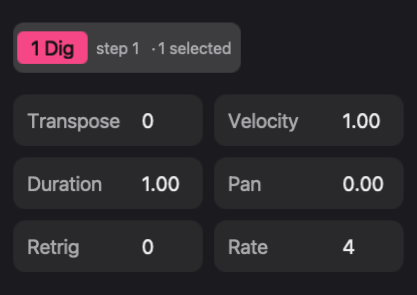
Selection survives while you work in the device panel, so this is easy to miss after a round of locking.
A knob jumps back, or will not stay where you put it
The parameter has locks in this pattern. A control with locks shows a marker in its corner, and during playback its value follows the playhead, so each locked step recalls its own value as it passes. Edit the locks in the lock table, or right-click the control and choose Clear p-locks.
If there is no marker, look for other writers:
- A process lane mapped to the control moves the value being played. The knob stays where you set it, and an amber marker shows the value in use.
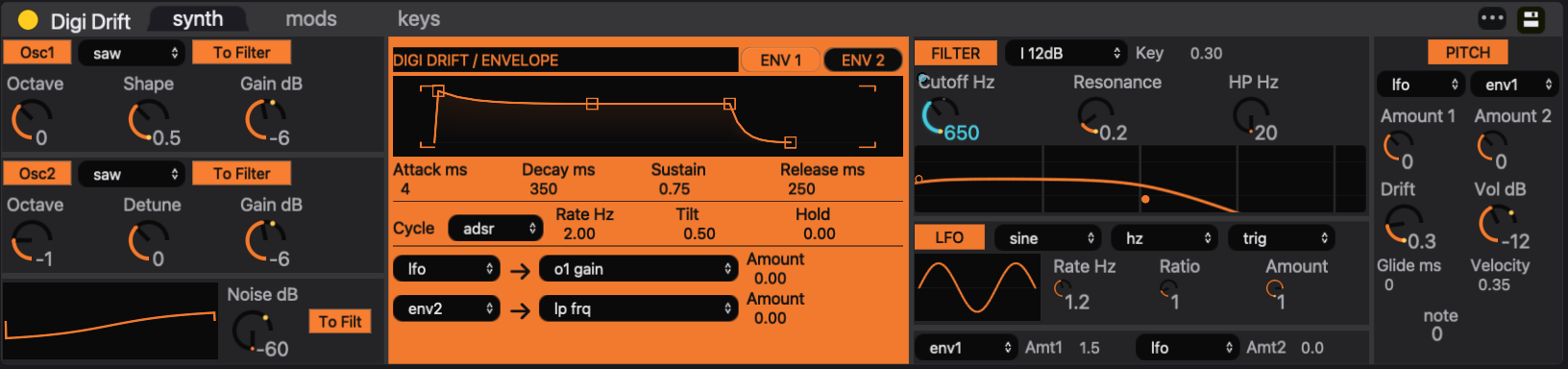
- A modulation source mapped to the control changes the value being played as it runs. See Instruments and presets.
See Parameter locks and Process lanes.
A control changed when a pattern or scene was launched
Nothing is wrong. A track's instrument settings, effect settings, fader, pan, sends, mute and output are stored with the pattern, so launching another pattern recalls that pattern's values. Bus and group effect settings are stored with the scene, so launching a scene recalls them.
To set one track effect value in every pattern, or one bus effect value in every scene, use Copy current values to all scenes in the effect header's ••• menu. See Mixer and Audio effects.
Editing one scene changed another
The two scenes point at the same pattern. Every edit to a shared pattern is heard in every scene that uses it, and recording into it adds notes there too. To make the current scene's version independent, click the track's pattern cell in the mixer and press Command-D: the copy replaces the original in the current scene only.
The same happens one level down when two patterns share a sound. After apply in the sound palette, both patterns use one patch, and a filter change in either is heard in both. Press + in the palette header to fork the sound. See Patterns and scenes.
The opposite surprise also occurs. + in the transport creates a scene from copies of every pattern, so an edit in the new scene does not reach the old one. To share a pattern between scenes, make the second scene current and click the pattern's cell.
The step grid ignores clicks on a track
While a take plays on a track's arrangement lane, that track's row is dimmed and read-only, because the take is not a pattern and an edit would change a pattern the lane is not playing. A green play triangle beside the track's volume control marks such a lane. A lane playing a pattern clip stays editable, and edits change that pattern. To edit the take, double-click the clip's title bar in the arrangement to open it in the piano roll. See Arrangement and Step sequencer.
Steps disappeared
- Half Pattern Length hides the steps past the new end. Double Pattern Length does not bring them back: it copies the remaining steps into the new second half. Undo the halving instead.
- Turning a step off keeps its step values but removes its chord and its locks.
- Clear Track Pattern… clears every step and lock in the pattern.
Each of these can be undone with Command-Z.
The wrong thing was deleted
Delete and Backspace act on the current selection, and which selection wins depends on where you are. In the sequencer and the device panel, selected steps take priority: with steps selected, pressing Delete to remove an effect deletes the steps instead. In the mixer, a pattern cell or badge you clicked is deleted first, and the steps only when nothing is targeted. Undo, press Escape to clear the step selection, click the thing you mean, and delete again.
A new instrument replaced the one on the track
Double-clicking an instrument in the browser replaces the instrument on the selected track. To add a track instead, drag the instrument onto Drop sounds here in the mixer. To add a layer to an Instrument Rack, drop it on the rack.
Replacing an instrument clears that instrument's parameter locks and key locks in every pattern, and drops process lane targets and graph sequencer settings that pointed at its parameters. The status line reports what was removed, for example "cleared instrument p-locks in 3 patterns". Command-Z undoes the replacement. See Instruments and presets.
A parameter is missing from the piano roll's Lane menu
The automation lane lists step values always, but device parameters only once they have at least one lock in the track's current pattern. Lock the parameter on one step, then reopen the menu. When the piano roll shows a take, or a clip whose pattern the track is not playing, device lanes are empty. See Piano roll.
The Pattern menu is unavailable
The Pattern menu needs at least one track, a sequencer view rather than a text buffer in front, and no text field in focus. Most of its items also need a track rather than a bus selected: with a bus strip selected, only the length commands and the capture commands stay available. Click a track row and try again.
A new track cannot be added
A project holds at most 64 tracks, and the status line reports "Maximum number of tracks reached". A Drum Rack's pads count, because each pad is a member track.
Voices and MIDI effects
A chord loses notes, or notes cut each other off
Check the track's voice settings in the track settings panel:
- voices limits how many notes sound at once, from 1 to 16. A chord needs at least as many voices as it has notes; overlapping chords need more.
- With poly off, or voices at 1, the track is monophonic and plays one note at a time.
- mute grp makes tracks in the same group cut each other off. Two tracks that should overlap must not share a group.
Voice settings belong to the pattern, so a chord can play fully in one pattern and lose notes in another. See Step sequencer.
An arpeggio stops early, or the pattern stops while you play
A clocked MIDI effect such as the arp runs only as long as the notes it receives. The step's duration, not its length on the grid, decides how long the arpeggio lasts; raise the duration. While you hold keys on a track with a clocked chain, the track's own steps stop triggering, and the pattern takes over again when you release them. See MIDI effects.
Process lanes
A process lane does nothing
Work through these causes in turn:
- The lane has no output. rand and count have no target until you map one, and × beside a target disconnects it. The OUT row of the lane strip shows the target.
- The steps are empty. Lanes run only on steps that play a note. A value painted on an empty step does nothing.
- The lane is switched off. The on/off button in the strip header bypasses it on this track.
- The value is too small, or too large, to hear. On an instrument or effect control, the lane's value is added to the control's position on its 0-to-1 travel. A rand range of 0 to 12 pins the control at its top; a range of 0 to 0.3 moves it by up to a third.
- The wire arrives late. A cable into an earlier lane arrives one step late, and its input port shows ↑. Move the writing lane up with ▲.
- The setting went to another track. With the scope chip on this track, a mapping applies to the current track only; with all tracks, it changes the shared setting, which a track with its own setting ignores.
- The source track is not playing. grab, xpose and harmony read the step the source track is playing.
A lane's running state, such as an accumulator's total, is cleared when playback starts from stopped, not when a scene changes. See Process lanes.
A roll step does not roll
The roll lane repeats a window at the lane's rate, and the rate must be finer than the step. A 1/16 step rolled at 1/16 has nothing to repeat. A roll that is already running ignores further roll steps.
Recording
Recording went to the wrong place
The view that is visible when recording starts decides what is written. Started in session view, recording overdubs into the pattern each armed track is playing. Started in arrangement view, it records takes onto the timeline. Switching views during the pass does not change this. See Recording.
In session view, recording writes into the pattern the track is playing. If that pattern is shared with other scenes, the new notes appear there too.
Recorded notes or knob moves are missing
- Record is a mode. Nothing is written while the transport is stopped; press Play with Record on.
- Only armed tracks receive notes.
- Overdub only adds notes. To replace a phrase, clear the steps first or undo the pass.
- Knob moves print only with no steps selected. With steps selected, turning a control writes locks onto the selection instead.
- Printing stops when you release the control, stop the transport, turn Record off or change the current track.
- In arrangement playback, a track whose lane is playing a take ignores overdubbed notes.
A phrase played without Record on can still be kept: Pattern > Capture MIDI… holds the last 30 seconds of live playing on armed tracks and racks.
An undo removed a whole pass
Each recording pass is one undo entry, ended when the transport stops or Record is turned off. Command-Z removes the whole pass, not the last note.
Arrangement
Play gives a loop instead of the timeline
If every lane is silent at the cursor, as in a new project or past the arrangement's end, Play launches the selected scene, and Back to Arrangement lights. A scene or pattern launched while the transport was stopped is also what Play plays next, because launches survive Stop. Click Back to Arrangement to hear the timeline, and set the cursor over a clip. See Arrangement.
The timeline ignores a clip
A manual launch of a scene or a pattern cell, whether the transport is running or stopped, takes the affected tracks away from the timeline until you hand them back. So does overdubbing a track during arrangement playback. The Back to Arrangement button in the transport lights while this override is in effect, and it stays lit after the transport stops. Click it to follow the timeline again. See Arrangement.
Export
Export Audio refuses to start
The dialog reports why an export will not start:
- "Export requires a nonempty range inside the arrangement": the Beat range is empty, or reaches outside the arrangement.
- "Export tail must be between 0 and 600 seconds": the Tail is out of range.
- "An export is already running": wait for it to finish, or cancel it.
- The file name is taken. An export never replaces an existing file; choose another name.
Export renders the arrangement only. To record a session performance instead, use the transport's WAV button. See Saving and export.
The export is silent or cut short
- Only clips make sound. A span covered only by a scene marker exports as silence, and a project with no clips exports silence throughout.
- Beat range counts beats from 0, not bars from 1. Eight bars of 4/4 from the top is beat 0 to beat 32.
- Tail, 10 seconds by default, is the time allowed after the end for reverbs and delays to fade. When audio is still sounding at the end, the dialog reports "Audio remains at the end; consider a longer tail."
The export renders the project as it stands when you click Export. Save as well, so that the file on disk matches the audio. See Saving and export.
A WAV recording has no file
The transport's WAV recorder writes its file when you turn it off. Turn WAV off, and the file appears in the Recordings folder, whose path the Export dialog shows. See Saving and export.
Layout and customization
A panel is missing
The three buttons at the left of the transport show and hide the browser, the mixer and the device panel; the View menu has the same switches (the device panel is Show Track FX). The arrangement view hides the mixer and brings it back when you return to the session view. View > Restore Default Layout shows every panel, returns the device panel to the bottom and rebuilds the session view's tiles, which also repairs tiles closed or split with C-x 0 or C-x 2.
A package changed how eseq behaves
A package can replace part of eseq, such as a view or a command. Open File > Customize… and find the package under Overrides. Switching it off restores the factory behavior at once, without uninstalling the package. A row marked quarantined raised an error, and eseq is already using the factory version in its place. See Keys and customization.
A shortcut is unknown
Help > Keyboard Shortcuts opens the chapter of this manual that lists the main shortcuts. Help > Search Commands… searches the menu commands by name, and M-x (Option-X) runs any loaded command by name. See Keys and customization.