eseq user manual
Saving and export
eseq keeps one piece of music in one project file and produces audio from it in two ways. Export Audio renders the arrangement offline to a WAV file. The WAV button in the transport records whatever the master output plays, in real time. Presets, Sounds, kits and packages are saved separately from any project, because they are meant to be reused across projects.
This chapter covers what a project file holds and what it only points to, saving and opening projects, the unsaved-changes prompt, rendering the arrangement, and live capture of the master output.
What a project holds
A project is a single JSON file in the projects folder. In the installed app that folder is ~/Library/Application Support/com.universalsequences.eseq/projects/. The file holds everything you authored in the project:
- the tracks, with their instrument settings, MIDI and audio effect chains, voice settings and mixer strips;
- every track's patterns, including steps, step parameters, parameter locks and bar transposes;
- each track's pool of sounds (the patches and mixes that patterns and scenes point to) and its recorded takes;
- the scene banks, including each scene's bus, group, modulation and graph-sequencer state;
- the arrangement: scene markers and clips;
- racks, their pad maps and rack clips, and any process lanes you added;
- buses, groups and macros;
- the tempo and master volume;
- the project scratch buffer, which holds the project's
(import …)lines and any code you keep with it.
Some things are stored by reference, not copied into the file:
- Samples are stored as paths into the sample library or your disk. The audio stays where it is.
- Instruments and effects are stored by name. The DSP code lives in the factory library, your own library or an installed package.
- Packages are attached through the project scratch. The project names the package, and the package itself stays installed on the machine.
This keeps project files small, but a project file on its own is not a complete backup. If a sample has moved, eseq looks it up by name. If it still cannot find it, the lane is left without a sample. The status line then reports Opened project '…' with N fallback samples, counting both samples found by name and lanes left without a sample. To take your own instruments and effects to another machine, export them as a package (see Packages).
Saving and opening projects
The File menu holds the project commands:
- New Project (Command-N) starts a new, unnamed project with two empty MIDI tracks; see Your first session.
- Save (Command-S) writes the current project to its file. A project that has never been saved opens the Save project dialog to ask for a name first.
- Save As… (Command-Shift-S) opens the Save project as dialog, prefilled with the current name. The project then continues under the new name.
- Open Project… (Command-O) opens the browser on its Projects tab.
- Open Recent lists the last 12 projects you saved or opened.
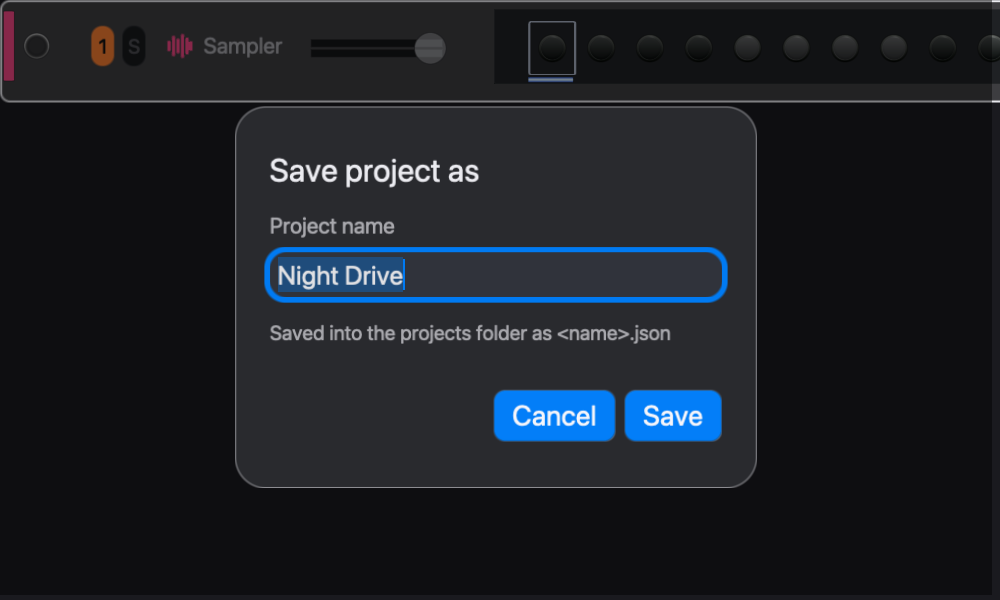
A project name becomes a file name. Letters, digits, hyphens and underscores are kept, and every other character becomes a hyphen, so a project saved as Night Bus is written as Night-Bus.json and appears under that name. Saving under the name of an existing project replaces that file without asking. Use a new name for each version you want to keep, for example before replacing a kit or recording over a section of the arrangement.
The Projects tab of the browser lists every project in the projects folder, with a New Project button above the list. Clicking a project opens it.
Note: the Projects tab does not check for unsaved changes, and File > Open Project… leads to the same tab. Clicking a project, or the tab's New Project button, replaces the open project straight away. Save first, or use File > Open Recent or File > New Project, which ask.
Unsaved changes
eseq tracks unsaved changes through the undo history. An edit that can be undone marks the project as changed. Undoing back to the point of the last save marks it clean again. A change that cannot be undone does not mark the project as changed, so quitting after one does not prompt. Save explicitly when in doubt.
When the project has unsaved changes, three commands ask before discarding them:
- File > New Project and Quit eseq (Command-Q, in the eseq menu; File > Quit eseq does the same) show Save changes first? with Save, Don't Save and Cancel. Closing the window counts as quitting. Save saves first, going through the name dialog if the project has never been saved, and continues only if the save succeeded.
- File > Open Recent asks Discard unsaved changes and open this project? with Cancel and Continue. It offers no Save, so save first if you want to keep the changes.
Exporting the arrangement
Export Audio renders the arrangement to a stereo 32-bit float WAV file. It plays the arrangement as it would play from the timeline: scene markers recall scene state, and clips supply the notes. A lane with no clip is silent, so a scene marker with no clips beneath it exports silence. Arrangement explains markers and clips. The export does not render session playback, meaning scenes or patterns you launch by hand. To capture a session performance, record it with WAV (below).
To export:
- Save the project.
- Choose File > Export Audio… (Command-Shift-E). The Export song dialog opens.
- Set the file name, range, sample rate and tail.
- Click Export.
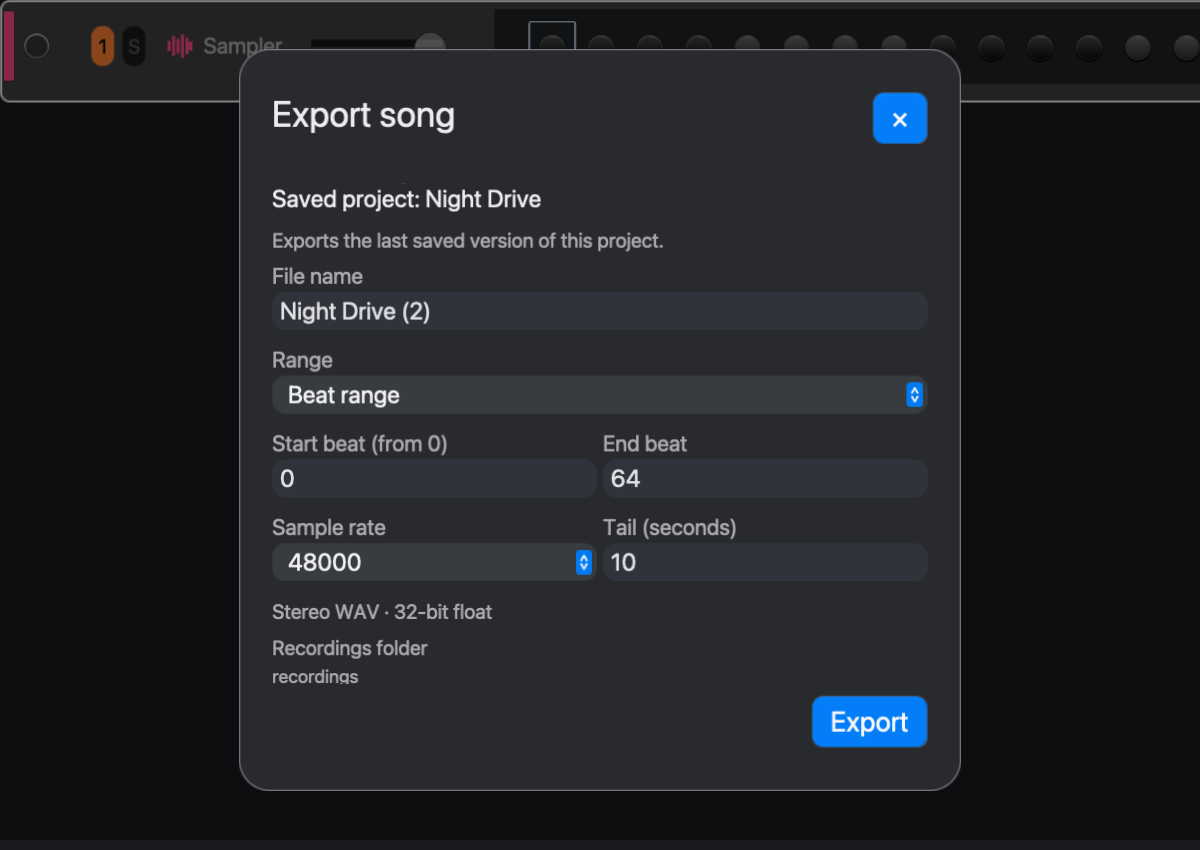
The dialog has these settings:
- File name. The default is the project name followed by the next unused number, such as Night-Bus (1) for a project saved as Night Bus. The name cannot contain
/,\or:. An export never replaces an existing file. If the name is taken, the export stops and asks for another name. - Range. Entire arrangement renders from the start to the arrangement's end. Beat range renders from Start beat to End beat. The range must lie inside the arrangement.
- Sample rate. 44100, 48000 (the default) or 96000 Hz.
- Tail (seconds). The time rendered after the range ends, so that releases, delays and reverbs can decay. The default is 10 seconds and the limit is 600. No new notes start after the end of the range; notes already sounding are released there and ring into the tail.
Beats are quarter notes, counted from 0. The arrangement ruler counts bars of four beats from bar 1, so bar n starts at beat 4 × (n − 1). For example, to export bars 9 to 16, set Start beat to 32 and End beat to 64. A beat range still starts in the right state: the renderer plays the arrangement before the range and keeps only the requested part, so reverbs and delays that were already sounding at beat 32 are sounding in the file.
The export runs in a separate process. The dialog shows progress, and Cancel export stops it without writing a file. eseq stays usable while the export runs. The export works from a copy of the project taken when you click Export, so edits made during the render do not reach the file. Instruments, effects and samples are loaded again from disk for the render.
When the render finishes, the dialog reports Export complete. If audio is still sounding at the end of the file, it reports Audio remains at the end; consider a longer tail. In that case, export again with a longer tail. Show in Finder reveals the file. New export resets the dialog for another pass.
Exported files go to the Recordings folder, whose path is shown at the bottom of the dialog. In the installed app it is ~/Library/Application Support/com.universalsequences.eseq/recordings/.
Note: despite the dialog's wording ("the last saved version"), the render includes unsaved edits. Save before exporting anyway, so that the project file on disk matches the audio and you can render it again later.
Recording the master output
The WAV button in the transport records the master output to a file while it is on. It captures exactly what you hear: scene and pattern launches, live playing, knob moves and mixer changes, whether or not the arrangement is playing.
- Click WAV to start recording.
- Play, launch scenes and perform.
- Stop the transport and let the tails fade out.
- Click WAV again to stop recording and write the file.
WAV does not depend on the transport or on the red Record button. Record writes notes into patterns and takes (see Recording). WAV writes audio only, and it keeps recording after the transport stops. The file is a 32-bit float WAV at the engine's sample rate, named recording- followed by a timestamp, in the same Recordings folder as exports. WAV clips anything above 0 dBFS, even though the file is floating point. Export Audio does not, so peaks above 0 dBFS survive a render but not a WAV recording.
Use WAV for live sets and jams. Use Export Audio when the music is laid out in the arrangement and you want a repeatable render with an exact start, end and tail.
The master output is also kept in a 30-second buffer at all times. Pattern > Resample Last 30 s… opens that audio in a crop dialog; Add as sampler track saves the cropped part to the sample library and loads it on a new sampler track. Use it when something good happened and WAV was not on.
Sounds, presets, kits and packages
These are saved outside projects, so every project can use them:
- A preset saves one instrument's settings. See Instruments and presets.
- A saved Sound (the browser's Sounds tab) stores a sound source, such as an instrument with its settings or a whole Instrument Rack. Loading one copies it into the track's sound, which the project then owns. See Samples and sounds.
- A kit saves a Drum Rack's pads, their sounds and effects, and the rack's shared effects. It also carries a rack clip for each scene ticked in the save panel (all are ticked by default). See Racks.
- A package carries instruments, effects and presets from your Library to another machine as an
.eseqpackarchive, written by File > Export Package…. Packages can also carry Lisp modules and samples, but those are assembled by hand. See Packages.
Saving a project does not save any of these. Loading a preset, Sound or kit copies its settings into the project; later changes to the saved item do not reach projects that already loaded it. Instrument and effect code is different: the project stores only the name, so editing a Library instrument changes it in every project that uses it.
If an export comes out empty or cut short, see Troubleshooting.